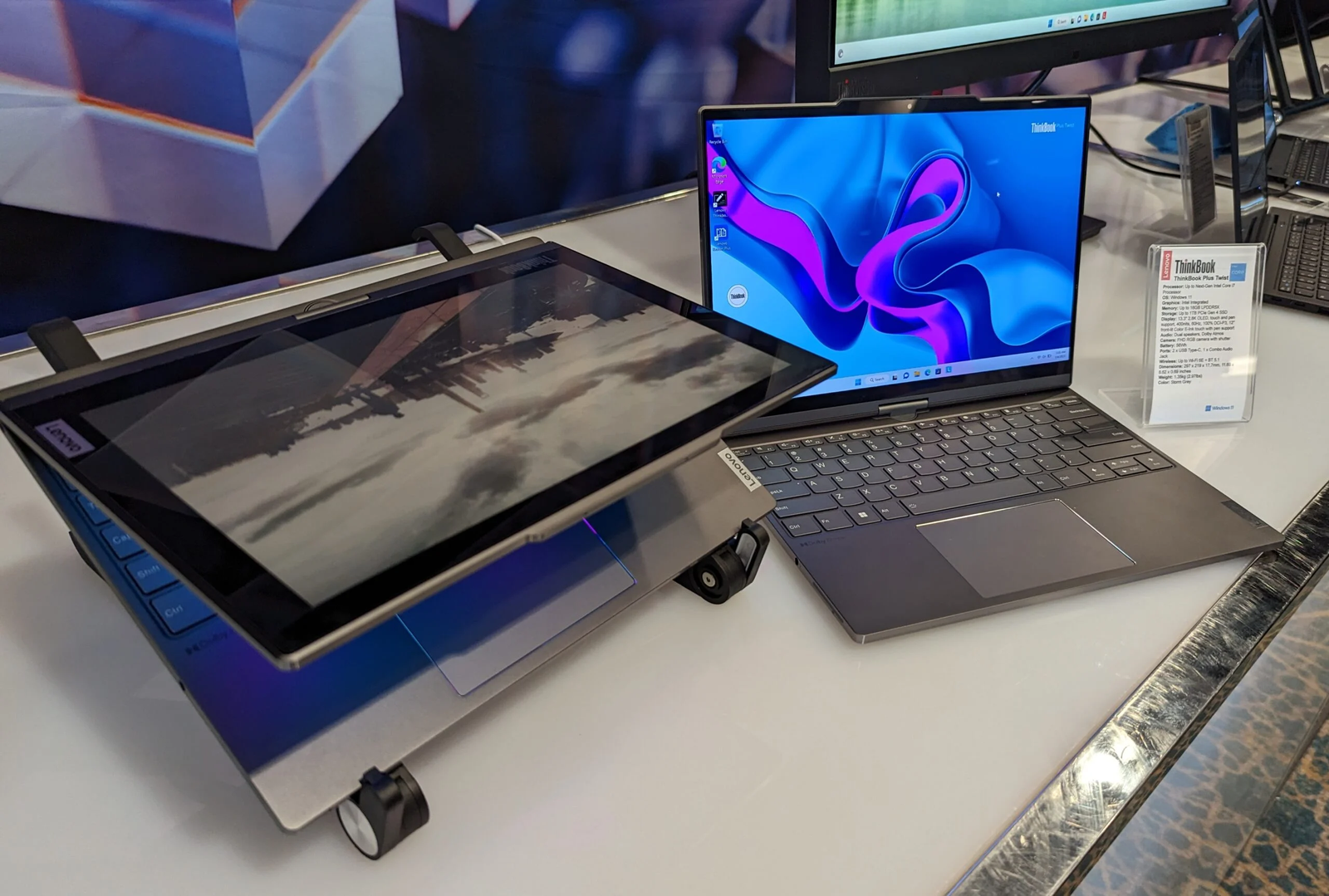
The Lenovo ThinkBook Plus Gen 7 Auto Twist is Lenovo’s most innovative laptop yet — taking a once-experimental concept and turning it into a real product aimed at mobile professionals, hybrid workers, and tech enthusiasts alike. Unveiled at CES 2026, this groundbreaking device combines a motorized pivoting OLED display, AI-enabled interactions, and solid modern hardware into a convertible laptop that adapts to how you work.
Let’s dive deep into what makes the Auto Twist a headline-grabbing laptop in 2026.
What Is the ThinkBook Plus Gen 7 Auto Twist?
The ThinkBook Plus Gen 7 Auto Twist reimagines the traditional clamshell laptop with a motorized dual-rotation hinge that allows the display to twist, tilt, and face you as you work. Gone are fixed display angles — instead, the laptop can automatically reposition itself based on your posture, movement, or mode of use (e.g., typing, presenting, tablet mode).
This isn’t just novelty — the Auto Twist aims to improve productivity, comfort, and collaboration during both everyday tasks and remote communication.
Key Features & Innovations
Motorized Auto-Rotating Display
- 14-inch OLED touchscreen
- Resolution: 2.8K (approx.) / 120 Hz refresh rate
- Brightness: up to 500 nits
- Dolby Vision and touch support
- Stylus-ready for annotation and drawing
The standout innovation is the motorized hinge — electromechanical motors quietly rotate the screen to suit your position, whether you’re presenting to others, using the device as a tablet, or simply adjusting your posture.
AI Integration & Smart Behavior
Built to feel more human than machine, the Auto Twist uses AI to:
- Track your head during video calls and reposition the screen accordingly
- Offer live language translation in conversations
- Respond to voice commands for hands-free mode switching
- Provide contextual assistance and interaction cues
This blend of motion and AI aims to create a more natural, responsive computing experience.
Technical Specifications (At a Glance)
| Feature | Specification |
|---|---|
| Processor | Intel Core Ultra Series 3 (Panther Lake) |
| Operating System | Windows 11 with Copilot+ PC features |
| Display | 14″ OLED, 2.8K, 120 Hz, Touch, Dolby Vision |
| Memory | Up to 32 GB LPDDR5x |
| Storage | Up to 2 TB PCIe Gen 4 SSD |
| Graphics | Integrated Intel Graphics |
| Battery | 75 Wh |
| Camera | Up to 10 MP with IR support |
| Audio | Dolby Atmos-tuned speakers + 4 mics |
| Ports | 2× Thunderbolt 4, 2× USB-A 3.2 Gen 2, HDMI 2.1, Audio jack |
| Wireless | Wi-Fi 7, Bluetooth |
| Weight | ~1.4 kg (3.09 lb) |
| Release | June 2026; starting around ~$1,649 USD |
This set of specs places the Auto Twist comfortably in the premium business laptop category with an emphasis on versatility and modern connectivity.
Modes of Use & Practical Benefits
The Auto Twist is designed to handle different scenarios:
Productivity Mode: Standard laptop use for documents, spreadsheets, coding, and multitasking.
Presentation Mode: The display rotates toward your audience automatically — ideal for meetings or hybrid work setups.
Tablet Mode: Twist the display fully for writing, sketching, or browsing.
Communication Mode: Use the screen tracking feature to keep your face centered on video calls — a small but impactful productivity boost for frequent remote meetings.
Design, Build & Portability
Despite its advanced mechanics, the laptop maintains a sleek, commercial aesthetic with a Luna Grey finish and a lightweight chassis. The motorized hinge is engineered to be quieter and more durable than earlier prototypes, signaling Lenovo’s commitment to bringing concept tech to everyday use.
The overall package — with powerful internals and smart hardware — still weighs just over 3 lb, making it portable for business travelers and remote professionals.
Who Is This Laptop For?
The ThinkBook Plus Gen 7 Auto Twist is ideal for:
- Tech enthusiasts who want the newest form factor
- Business users looking for advanced productivity tools
- Remote workers who frequently present or video call
- Digital creators who benefit from a stylus-ready touchscreen
It’s not just a gimmick; it brings tangible workflow improvements if you value flexibility and smart interaction.
Real-World Considerations
Though the Auto Twist’s adaptive screen is innovative, its real-world utility will depend on software polish and personal workflows. Early reports suggest the feature can offer real benefits in dynamic use cases, but it may feel like a novelty for users who stick mostly to static laptop tasks.
Battery life with a motorized display and bright 120 Hz panel is decent thanks to a 75 Wh unit, but heavy AI and screen usage could shorten runtime compared to conventional laptops.
Key Takeaways
The Lenovo ThinkBook Plus Gen 7 Auto Twist marks a bold leap in laptop design — blending hardware automation and AI to create a machine that responds to you.
If you’re a professional seeking cutting-edge productivity and a future-ready device, this laptop deserves serious consideration. It may redefine how we think about laptops — not just as static tools, but as adaptive smart workstations.